
Bubble Launcher full version2.6.1 - Get APK
You'll be able to download in few seconds.
Publisher Description
+ New + New + New + New + New +New +New +New +
Update ver 2.6.1 (09202013)
- Nexus 7 compatibility (and more other devices, that don't have telephony functions)
Update ver 2.6(09182013)
- New Activity-Shortcuts for installed Apps and their launchable activities.
To get them all in Blacklist and Fav-Editor use 'Refresh app Database' in settings!
That may take some seconds - will give you access to a ton of system settings panels
All recognized activity-shortcuts will be blacklisted after import by default.
Mark those of them, you want to use, as Favorites...
- New swipe actions - Diagonal Up / Diagonal Down - all swipe actions can be customized now in settings
- precise recognition of swipe actions / new gesture engine
- New working 'Change Long Click/Short Click' Option for app lists and panels
- better contact Photo / contact engine for builtin floating Notification
-major bugfix: BL stopped when removed from recent apps list
BL won't be shown in recents apps now!
- Floating Status Bubble with System Status Icon for showing/toggling hardware status
useful, if your device runs in fullscreen mode w/o Statusbar
to activate it: swipe diagonal up from Hotspot Bubble
to move it: double tap+hold+pull
short click on Status Icons -> toggle status if something can be toggled
long click on Status Icons -> open System setting Panel for related component
click on lock icon to dock Status Bubble permanent on screen
- Floating Hotspot Bubble
now with custom positioning; to move it, double tap+hold+pull
HotSpot Bubble can be docked anywhere on left or right border or anywhere on screen
- downsized lists and panel for low count of 'marked as favorite' apps)
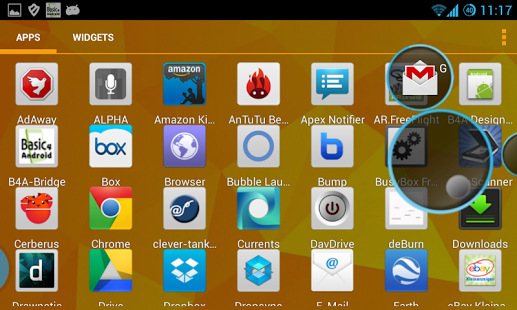
Bubble Launcher is an 'always on top' side launcher for Android OS. It can be used on top of every opened app.
The starter halo hotspot is made as floating system window, so it can be on top of everything on screen!
The Launcher comes with a
-standard listview
and
- circle halo knob
for selecting an starting an app.
Hotspot -> swipe left -> opens Circle Launcher;
Hotspot -> swipe up -> opens Favorites Panel;
Hotspot -> swipe down -> opens App-List-Launcher;
Short Tap on App in List -> HALO)))-start of app;
Long Tap on App in List -> Fullscreen-start of app:
circle launcher -> circle swipe to outside -> fast release -> HALO)))-start of app;
circle launcher -> circle swipe to outside -> wait a second release -> fullscreen-start of app;
circle launcher -> circle swipe inside Halo-knob -> no app will be startet;
Bubble Launcher supports Halo))) start of apps in MULTI_WINDOW on Paranoid Android 3.56 and above!
And of course you can start apps also in Fullscreen Mode.
On non Paranoid OS the apps will always be started in Fullscreen Mode.
In the full version of Bubble Launcher you can mark any app as blacklisted or favorite.
Blacklisted apps will never be shown in the launcher lists.
Favorite apps are listet on top of standard listview and are the only listed apps in circle launcher mode.
You can test Bubble Launcher's free XDA version, before purchasing.
If your device runs Android 4.3+ (and only than!) you can use the new builtin 'floating notifications'-function.
That for you have do Download and install 'NLSHelper' from XDA-thread (for free) or here in Play Strore (donation version)...
For custom theming and more informations have a look for the 'HowTo's at XDA-thread
IF YOU WANT TO UNINSTALL the app, than first go to settings -> security -> device administrators and un-tick the box for Bubble Launcher
About Bubble Launcher full version
The company that develops Bubble Launcher full version is Reinhard Strauch. The latest version released by its developer is 2.6.1.
To install Bubble Launcher full version on your Android device, just click the green Continue To App button above to start the installation process. The app is listed on our website since 2013-09-19 and was downloaded 0 times. We have already checked if the download link is safe, however for your own protection we recommend that you scan the downloaded app with your antivirus. Your antivirus may detect the Bubble Launcher full version as malware as malware if the download link to de.esolutions4you.bubblelauncher is broken.
How to install Bubble Launcher full version on your Android device:
- Click on the Continue To App button on our website. This will redirect you to Google Play.
- Once the Bubble Launcher full version is shown in the Google Play listing of your Android device, you can start its download and installation. Tap on the Install button located below the search bar and to the right of the app icon.
- A pop-up window with the permissions required by Bubble Launcher full version will be shown. Click on Accept to continue the process.
- Bubble Launcher full version will be downloaded onto your device, displaying a progress. Once the download completes, the installation will start and you'll get a notification after the installation is finished.
Program Details
System requirements
Download information
Pricing
Version History
version 2.6.1
posted on 2013-09-19
BEFORE INSTALLING FULL VERSION!,UNINSTALL DEMO VERSION, IF YOU HAVE INSTALLED IT BEFORE.,Update ver 2.6.1 (09202013),- Nexus 7 compatibility (and more other devices, that don't have telephony functions)
version 1.5
posted on 2013-06-28
Several fixes and updates
Disclaimer
External Download
We do not host Bubble Launcher full version on our servers. We did not scan it for viruses, adware, spyware or other type of malware. This app is hosted by Galad and passed their terms and conditions to be listed there. We recommend caution when installing it.
The APK Download link for Bubble Launcher full version is provided to you by apps112.com without any warranties, representations or guarantees of any kind, so access it at your own risk.
If you have questions regarding this particular app contact the publisher directly. For questions about the functionalities of apps112.com contact us.
